I need 6/8 time in section 1 but then it changes to 4/4 time section 2. How do I change it?
There are buttons for changing the time signature of the current selection in the Chart menu of the editor:
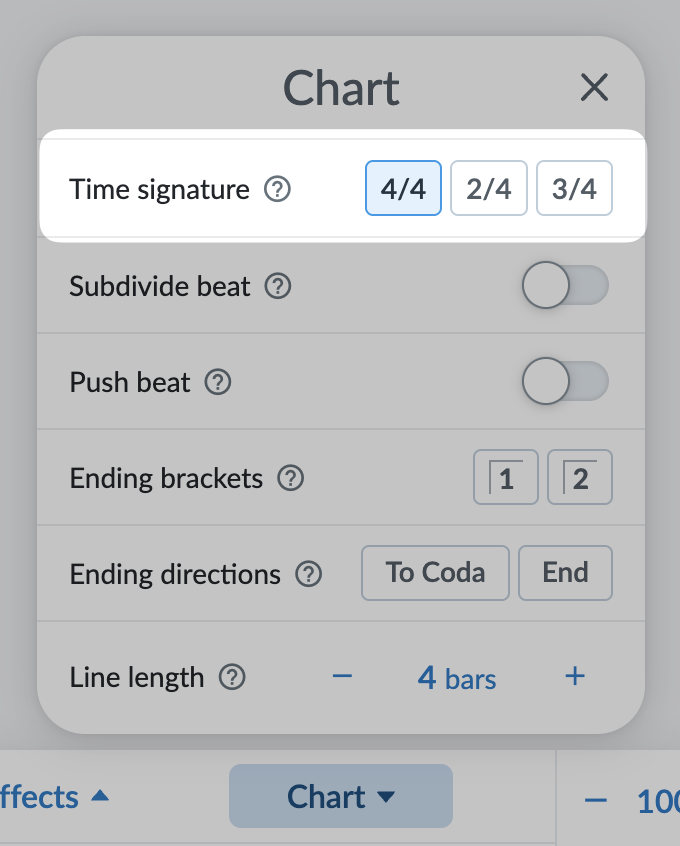
However, as you may have discovered, they cannot be used to switch between 6/8 time and 4/4 time. This could potentially be an option in the future, but it’s a more complicated scenario to implement so I left it as unsupported for the first release of the mid-song time-signature changes features (which was added just this last summer).
For now, the only way to switch between 6/8 and 4/4 time is to use a medley.
I’d like to be able to use 6/4 time but looks like I have to use 4/4 + 2/4. Any plans for more time signatures? Also, I’m with the original poster— I would like to be able to switch between 6/8 and 4/4 too.
No firm plans for more time signatures but that may change.
Can you tell me what song(s) need 6/4 time and switching between 6/8 and 4/4? Knowing the context would be helpful and help me figure out how to approach these situations in the app. (They’re not as straightforward as what’s there already.)
@FrancesFister I neglected to ask you the same question: what song(s) are you trying to enter that need both 4/4 and 6/8 time?
Luke, I have a tune with parts in 3/4 repeating and then a repeated 6/8 part. It may be a Musette. Valse des Cravates in my tunes. I had to make a medley. But you can only play a whole medley once. So if I want to play a second time, I’d have to include the individual “part-tunes” the same number of times—inflexible. The chart should have at least 6/8 as a choice if you don’t do more. My French Fiddle Tunes book has several less common time signatures. Some I can fudge like 12/8, 9/8.(note that these two have names-(slip-jig and double jig).
1 Like
I think I have found a workaround. If you open a new song and enter the passage with the new time signature, you can copy the passage and paste it into your intended song. Both time signatures will be represented there.
1 Like