How can I reduce the font to get all of my songs to fit on one page. My iPad settings let me enlarge font, but not reduce font size for apps. I run out of single page space trying to fit intros, outros, and bridges, etc. on one page. With the new format the toolbars take up even more space, and I can’t see my chart. Can I disappear the tool bars when I’m playing a song, and just bring them up to edit.
I’m a beginner bass player and need to fit one song per page during a show.
Please help!
Two answers to this. The first is that we’re working on ideas for giving you more viewing space by hiding the toolbars and so forth; a “full screen” mode of some kind. Stay tuned.
The shorter-term solution is to make sure you have the latest version of the app from the App Store, and then change the system Text Size setting for Strum Machine. Here’s a quick video I threw together to show how to do this:
Unfortunately I don’t think the app has a way to shrink the text. If I need songs for a show I print them out, and put them in a binder. This way you can shrink the print out to all fit on one page, and no worrying about iPad dying mid-show. I’ve also seen guys at jams with a Bluetooth foot pedal that will scroll up/down. I know this might not be the answers you’re looking for, but hope this helps.
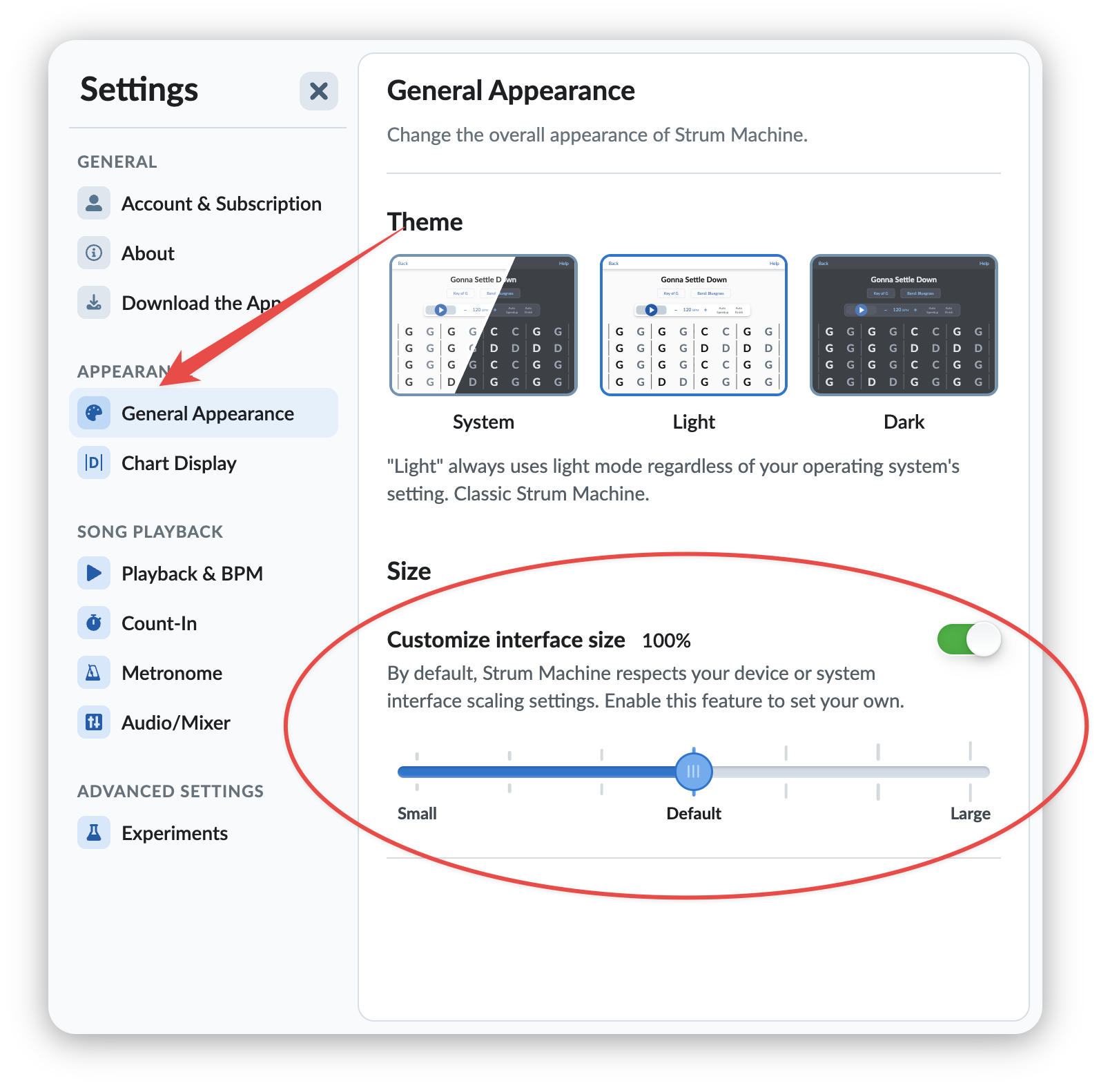
Update: There’s a new setting that lets you change the size of the interface (and text) in Strum Machine. Go to Settings > General Appearance to access it:
2 Likes