I prefer Nashville numbers for most songs, but for a few song my brain is too slow and needs the letters spelled out. Though I can change the global ‘Show chords as…’ setting when going to/from such a song, it would be more convenient (faster in a jam) if I could just override the display for specific songs so they locally latch to whatever type of display I always want for that song.
Or if I can download a faster brain, that’s a fine option too.
I’ve thought about adding a way to set per-song preferences for chord display (and other options like count-in) because I will hear requests for it from time to time. But I’ve done surveys on the matter and the vast majority of users had no interest in it, and I can’t figure out a way to add it without complicating the interface in a way that would make it less elegant and more confusing, so I’ve decided against it.
That said, I hear you about those complex songs, and I wonder if another solution for your problem would be to add a way to show a quick numbers-to-letters “cheat sheet” below the song? For example,
1 = A 3b = C 4 = D 5 = Eetc
…or perhaps… 1♯⁶ = A⁶ 1♯º⁷ = Aº⁷ 2m⁷ = Bm⁷etc
Haven’t thought too deeply about this sort of feature but it’s been suggested before and I think it may have merit as a learning tool if done right…
Then again, this might be just as slow or slower than you just figuring it out in your brain!
Customizable keyboard shortcuts are coming, and I expect to add this as an option that you can bind to a key. That won’t help you on a phone or tablet (“in a jam”) unless you connect a Bluetooth keyboard, but I also want to explore adding customizable gesture support which you could in theory bind to the same function.
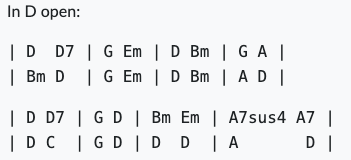
Thanks for putting the thought into it and the response! No problem if this is a unique use case; I can understand your decision. In the meantime, my workaround is just to put the actual chords in the Notepad, e.g. like this for Ashokan Farewell. (Yes, the cheat sheet conversions would also work, but still a lot of stress for my brain LOL.)
In D open:
| D D7 | G Em | D Bm | G A |
| Bm D | G Em | D Bm | A D |
| D D7 | G D | Bm Em | A7sus4 A7 |
| D C | G D | D D | A D |
I’m confident that even before image attachments arrive we’ll have a font-size adjustment for the Notepad. If that doesn’t happen this year I will eat my hat.
In beta there’s now a ‘chart display’ button in the bottom bar on the ‘song’ screen. At this point it is still an overall setting. Are you considering making this into a per-song setting after all?
I’m not sure. When I polled users about per-song chart or count-in settings, they were overwhelmingly not interested. I may do another survey about it at some point, but I’m wary of adding this kind of complexity. Part of the hope of the new UI is that it’s easy enough to change these settings as needed that having them remembered per song isn’t as important. That’s the hope, anyway…
I actually sort of thought the same. But I was wondering before why you would add this subset of the overall settings to the song page, without it being song-specific and/or something people would frequently change. Felt sort of arbitrary, and since lack of space is a thing…
Count-in settings are different, I think, since the ‘rhythm’ will/can be different for different time signatures, or if you want to skip some beats for a certain intro… Even if not a song-specific setting, it is still nice to have it readily available
The choice of what to put in the “quick access” settings panels was based on aggregated usage data I’ve collected over the years on what settings are most frequently changed. The count-in settings are among the most frequently changed (especially count-in length and “count every repetition”), but so is the chord system (letters/numbers) and of course instrument volumes/mute. I don’t expect all the settings in these menus to be used as frequently, but it seemed right to put closely related settings together and not remove settings that were previously available in the side menu.
It will be interesting to see how the settings get used now that they’re more accessible. Will people toggle “Use slashes” or adjust the repeated chord shading in the Chart Display settings? Time will tell.